
'/%3E%3C/svg%3E)

Here’s our roundup of 5 Microsoft Teams developments for October 2021!
This article will cover the latest Microsoft Teams developments in October 2021, which have made this tool more powerful than ever before!
- Breakout rooms manager support for presenters and Breakout room pre-meeting room creation and participant assignment
- Live transcripts of ad-hoc and channel meetings
- Presenter mode ‘Standout’ in PowerPoint Live.
- Enhanced capabilities for Visio Viewer in Microsoft Teams
- Microsoft Teams in Windows 11
Breakout Rooms
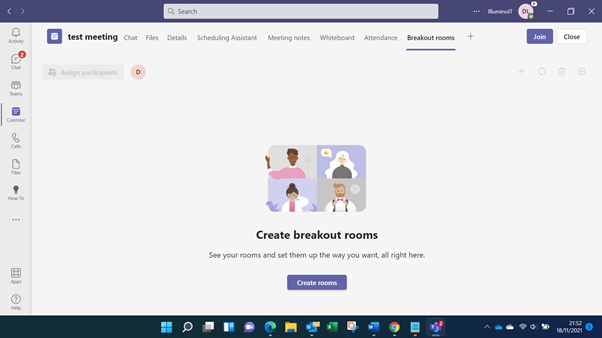
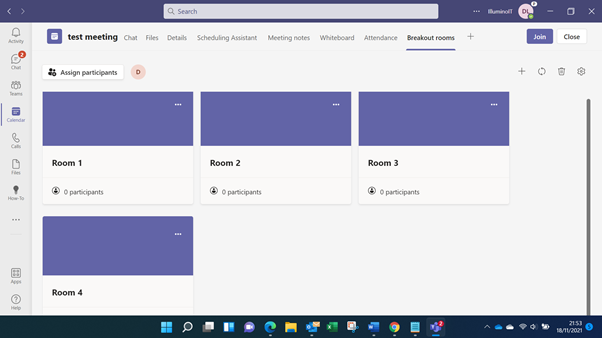
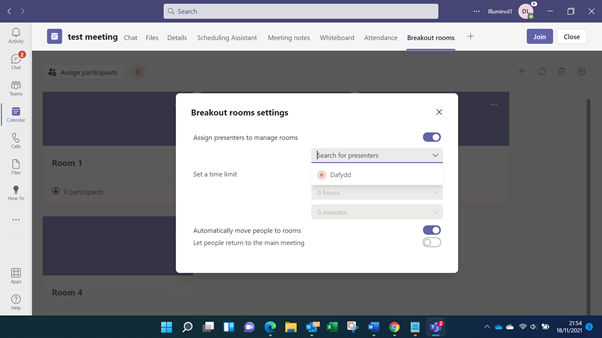
Microsoft Teams has made two big improvements related to breakout Rooms. Firstly, a meeting organiser can now set up presenters as managers for meeting rooms. This is especially useful when the organiser of the meeting needs to delegate the running of the breakout rooms to someone else within the meeting.
Secondly, it is now possible to create breakout rooms in advance and pre-assign meeting attendees to those breakout rooms. This ensures the organiser and breakout room managers can take care of this task in advance of the meeting, and not when others have already arrived and are waiting eagerly to get going!

Live transcripts of ad-hoc and channel meetings
Can you be in two places at the same time? Microsoft Teams already offered live transcript functionality for scheduled meetings. It now offers this experience with live transcripts of your ad-hoc conversations and channel meetings! You can now find it easier to remember what was discussed, and share those insights with others, thanks to live transcripts. What could be more efficient than a conversation captured as text!
Presenter Mode in “standout” for Powerpoint live
Another feature, which was already in Microsoft Teams elsewhere is the new standout mode for Powerpoint Live. While three presenter modes had been released for screen sharing (reporter, side by side and standout), these were not available until now when using Powerpoint live to present. You’ll already find the ability to use standout mode available when using the Powerpoint Live functionality, but look out for reporter and side by side modes also becoming available shortly. All you need to be more interactive with your audience when presenting!

Enhanced capabilities for Visio Viewer in Microsoft Teams
With the enhanced Visio Viewer in Microsoft Teams, you can now comment on, share, and print an image of your Visio diagram quickly and easily. This is a huge step forward for those organisations that may not have many staff members needing to create Visio Diagrams but benefit greatly from being able to view and share feedback on those diagrams.
Teams changes / Updates for Windows 11
Here’s where things get quite complex, quite quickly and I’ll try and explain in the simplest terms possible!
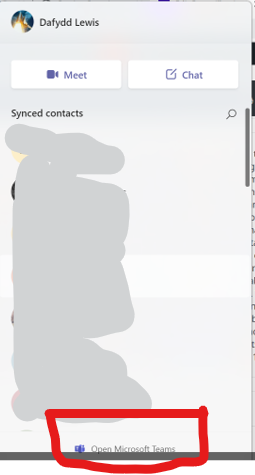
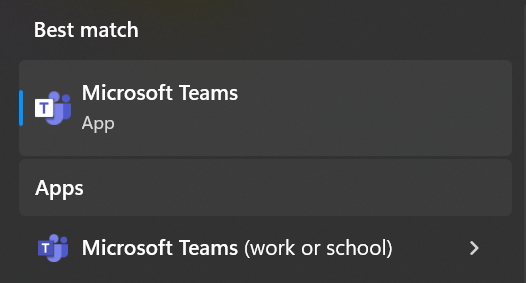
Built into the Windows 11 operating system is a chat experience that allows the logged-in user to quickly fire up chats with their personal contacts. This can look up your contacts from what would have been Skype or your Hotmail or Outlook accounts for example. Within this chat functionality lies a link that allows you to open up an embedded version of Microsoft Teams. However, do not be fooled into thinking that this is the same version of Teams as you had for your corporate work. It is labelled Microsoft Teams, but if you find the icon for the app you’ll see that it has a Blue T on a white background. Again, this works with your personal account and is not suitable to use with your work/school account (which you may also know as your Microsoft 365 account or your Azure AD account).
Should you wish to use Microsoft Teams with your work or school account, you will need a separate version of the Microsoft Teams client (or use it on the web). This is available as a download and will also still be there if you’ve done an in-place upgrade from Windows 10. This Microsoft Teams app will now be called Microsoft Teams (work or school) and its visibly distinct icon is a white T on a blue background.
Confusing, yes and we hope this can be sorted out swiftly because we’re certain that this will cause no end of issues for both end-users and helpdesks alike as adoption of Windows 11 in corporate settings increases! If things stay as they are, enterprise IT depts will certainly need to be able to disable the personal version of Teams built into Windows 11.

Summary
The new Microsoft Team features in October 2021 build on an already impressive collaboration platform. Breakout room improvements will greatly enhance the user experience and relieve pressure on meeting organisers. Transcriptions of ad-hoc calls and channel meetings open up the possibility of searching and reviewing the information which was shared. With the enhanced Visio Viewer, you can now comment on, share, and print Visio diagrams without needing the full program and take your Powerpoint live presentations to the next level with standout presenter mode. Despite these very useful additions to the toolkit, we do hope that Microsoft reviews the way Microsoft Teams currently sits within Windows 11 as they refine the new operating system for the future.
To see what’s on the horizon, check out the Microsoft 365 roadmap (including Microsoft Teams) here:
https://www.microsoft.com/en-us/microsoft-365/roadmap
Be sure to follow our channels on LinkedIn, Facebook and Youtube for more updates like these. Check out our recently launched academy for our first course on Microsoft Teams!
https://academy.illuminoit.co.uk
Let us know in the comments whether this was useful for you and if there is anything else you’d like to see us cover.
Till next time!