
'/%3E%3C/svg%3E)

Introduction
Following our short live session on Microsoft Viva earlier this week (https://youtu.be/Rtjlbxr_-1E) we thought we’d complement it with a blog to go into a bit more detail.
In this blog we’ll introduce you to Viva on a high level and then go into each module to explain how Viva is designed to improve the employee experience.
First introduced in early 2021, Microsoft Viva is an employee experience platform comprised of four modules. These are Viva Connections, Viva Learning, Viva Topics, and Viva Insights. If you’re a Microsoft 365 user, you may already be familiar with Viva Insights from an email you receive weekly and monthly, providing wellness and productivity tips. See below for an example email.
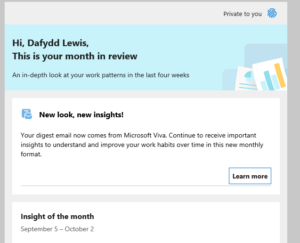
Viva Insights Email
Improving Employee engagement is one of the key aims of Viva. The pandemic has seen lots of us working at home, in remote settings for extended periods of time. Sometimes it’s just not as easy to get the information we need, or the help to get a project or a task going. Microsoft Viva helps by ensuring employees have access to the information and resources they need to do their jobs, at the right time, and by encouraging them to take note of their well-being through regular prompts.
We know that keeping employees engaged is important for the productivity of our Teams, but with the “Great resignation” (Anthony Klotz) making it harder and harder for organisations to keep hold of talent and recruit, this is more important than ever before.
One of the additional beauties of Microsoft Viva is that it’s all available in your Microsoft Teams client. So many of us have already moved our daily workload into Teams, and to have this new functionality at our fingertips in the same place is great.
Licensing and access considerations
Microsoft Viva Connections is included as part of a large number of Microsoft 365 products. Viva Insights for personal insights is also included, as are many features of Viva Learning.
Here is the list of subscriptions that include the base Viva modules at the time of writing (Jan 2022). “Microsoft 365 F1, F3, E3, A3, E5, and A5; Office 365 F3, E1, A1, E3, A3, E5, and A5; Microsoft 365 Business Basic, Business Standard, and Business Premium; or SharePoint K, Plan 1, or Plan 2.” – Source: Microsoft.
If you want access to team and organisation insights, this will require a separate license. Advanced Viva Learning features including course recommendations and integrations with partner providers is available as an add-on. Viva Topics also requires an additional license.
Pricing
At the time of writing (Jan 2022), there is a Viva promo from Microsoft. Access to premium features on all three modules (learning, topics and insights) can be purchased for £6.80 ex VAT per user / per month (usually £9.07 ex VAT). Premium features in individual modules can be purchased for £3.00 ex VAT per user per month.
Viva Connections
If you’re still looking for the home site app, as was I for some time, you’ll find it was released under the Viva banner as Viva Connections.
Viva Connections brings your company intranet and company news into Teams, but that’s not all it does. It is also able to target information to users, based on their various requirements using AI. Relevant information can be surfaced at the right time so that employees can feel engaged and have the information they require at the right time to do their jobs.
Viva Connections does require some setup, and you will find yourself needing to run some Powershell commands to get the Teams icons and app set up. It is worth it, however for your employees to have the intranet and the information critical to their success at the tip of their fingers. Being able to access this effectively on a mobile device is also important, especially for remote field workers who may not be at a desk for long periods of time.
Viva Insights
As mentioned earlier, Viva Insights is probably the best-known module of Viva, purely because of the regular email which is sent out, usually telling us we’ve been in meetings too long!
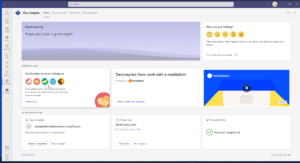
Viva Insights In Teams
There are three main types of insights Viva will provide, being:
- Personal
- Manager level
- Leader (enterprise) level
Each one is designed to help make decisions which will lead to better productivity, while promoting wellbeing. The app will also help individuals protect time in their calendars to be able to focus on work that’s important. So valuable in this world of constant distraction!
The aim of Viva Insights is to improve Employee Wellbeing and to provide insights to workers and managers alike on productivity within their teams. Insights for managers and the higher-level leaders’ insights across the organisation will require an additional license or add on.
Finally, there is an integration with Headspace, a company specialising in guided meditations and mindfulness. In this instance, there are several scenarios which they provide within Viva Insights, depending on the situation. Some examples include: Helping you to disengage from a day after working from home, listening to others by being present and many more.
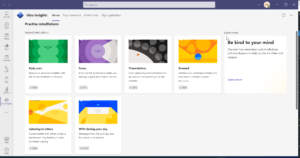
HeadSpace Scenarios Viva Insights
Viva Learning
Microsoft Viva Learning brings together and makes it easy to access top-quality learning resources and insights. The platforms integrated into Viva Learning as a default include:
- Microsoft Learn
- Linkedin learning
- Microsoft 365 learning
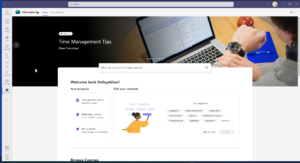
Viva Learning In Teams
However, Viva learning does integrate with other learning providers and platforms such as Pluralsight, Salesforce so that employees can access their training through one convenient portal in Microsoft Teams. You can also connect it to other learning management systems, although bear in mind that some of the more advanced features will require you to purchase a Viva pack, or an add-on.
Viva Topics
Viva Topics aims to fill a gap that the pandemic has created, and connect employees to information and people of interest. That may be as part of a project, or a specific resource they are looking for.
Viva Topics uses AI to scan data within the Microsoft 365 Tennant and bring it to the surface, through search in the form of Topic cards, pages and centres. From those topic cards, employees can find relevant information, be that in documents, e-mails, Sharepoint lists or any other data store they may have access to in MS365. They can also find other employees easily who have the skills in the topics they are looking for.
Conclusion
Microsoft Viva certainly provides a great start to improving employee engagement, and some tools to help organisations do this. The employee experience is integral to Viva, but it is however another tool. Organisations should understand how it works in practice, and how they can implement it in their workplace to co-exist with other employee engagement and wellbeing initiatives. It is not as easy as thinking that implementing all Viva modules will magically fix all employee engagement issues!
Several new initiatives are due for release in 2022 under the four Viva modules, so the suite will only continue to improve and try to bridge that pandemic employee engagement gap even more (although it’s definitely not just the Pandemic that has lead / leads to employees disengaging although it has probably exacerbated the issue).
IlluminoIT Limited
Is a training and IT Consultancy, based in Cardiff, Wales. We specialise in Microsoft products and in-particular Microsoft 365. It’s founder Dafydd is an MCT for 2021 – 22 and a Microsoft Teams Certified Administrator. For more information on what we can do for your business to unlock the power of Microsoft 365, get in touch with us using our contact form. We speak four languages and would be happy to talk to you in Welsh, English, Portuguese or Spanish!